
Your NAT type is a label for how easily other players’ devices can reach yours directly, and it comes in three flavours: Open, Moderate and Strict. Open means connections come straight through, Moderate means some get filtered, and Strict means most inbound traffic gets blocked before it ever hits your phone. If you game on cellular data or hotel and café Wi-Fi, you are almost certainly sitting on Strict or Moderate, because carriers and shared networks put hundreds of devices behind one public address. That is why party chat drops, matchmaking takes forever, and you keep getting pushed into lobbies far from home.
Table of Contents
Open, Moderate and Strict Side by Side
The quickest way to tell them apart is to watch what happens when you try to host. On Open, you can host a lobby and friends join in seconds. On Strict, you can only reach people who are on Open, which cuts out a big slice of the player pool.
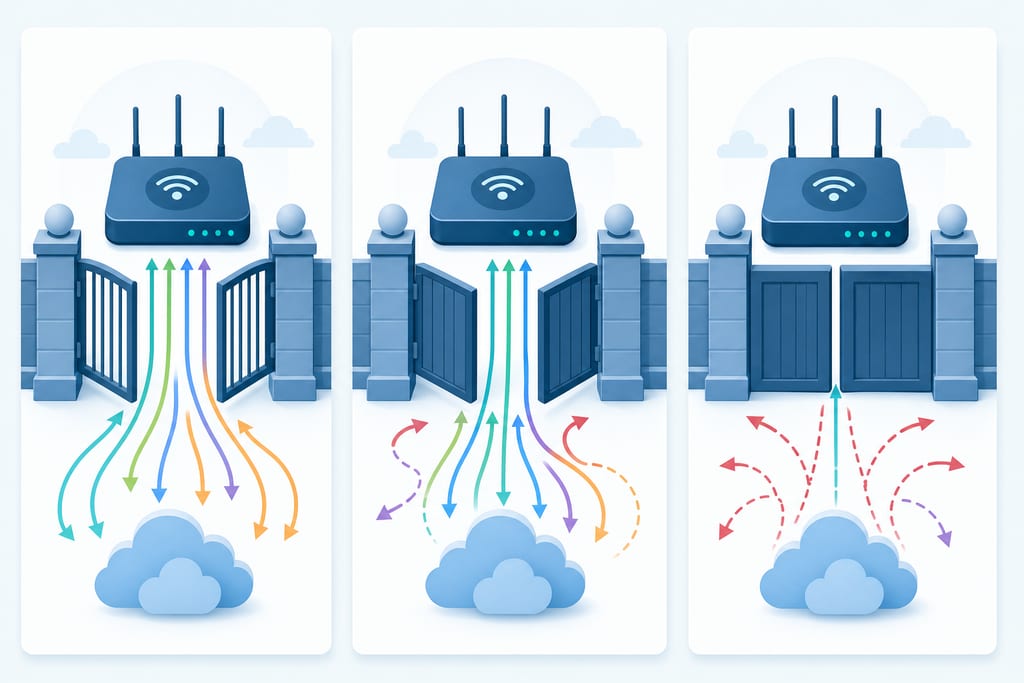
Moderate sits in the middle. You will usually get into matches, but the game may hand hosting duties to someone with a worse line, or sit you in the queue while it hunts for a compatible lobby.
| Level | Party chat | Matchmaking | Can host |
|---|---|---|---|
| Open | Stable | Fast | Yes |
| Moderate | Mostly fine | Slower | Sometimes |
| Strict | Drops often | Long waits | No |
Most mobile games never print a label on screen, so judge by symptoms: voice cutting in and out, repeated “connection to host lost” messages, long queues at peak hours. This is not the same thing as ping. It decides who you can connect to, not how fast the data moves once you are in.
Why Your NAT Is Strict in the First Place
Strict is usually the default, not something you broke. Routers and carriers block inbound traffic unless something tells them to allow it, and games need that inbound path to work properly.
The usual culprits:
- UPnP switched off on the router, so games cannot open their own ports
- Carrier-grade NAT, where one public IP is shared across many customers, standard on mobile data and some fibre plans
- Hotel, airport, dorm and café Wi-Fi, which block incoming connections on purpose
- Double NAT, when a modem and a separate router both hand out addresses
- Firewalls or DNS filtering tools that tighten the rules further
Picture a work trip: you connect to hotel Wi-Fi, and the network’s gear is set up for web browsing and email, not game traffic. On 5G, your carrier puts your phone behind shared infrastructure for the same reason. Neither network is broken. Neither one will give you Open unless you leave it. Gaming on public Wi-Fi brings its own security problems on top of the matchmaking ones.
Fixes That Actually Open Your NAT
Start with the cheapest fix and work up. Most home connections clear up on the first step, and you only need the later ones if your hardware or provider is the problem.
- Turn on UPnP in your router settings, then restart the game
- Give your device a static local IP, then forward the ports the game publisher lists
- Put the modem in bridge mode so only one device assigns addresses
- Ask your provider if you are on carrier-grade NAT and what they can offer
Here is a walkthrough of the router steps if you want to see them done on screen.
Be honest about what encryption does here. A VPN will not set your connection to Open, but it can route you past a network that blocks or throttles game traffic and hide your IP on shared Wi-Fi, which GamingVPN handles on iPhone, iPad and Apple silicon Macs with no login. What you get out of it depends on your own line and the server you pick, so it is worth testing a couple before you judge whether a VPN lowers ping for you.
Pick the One Setting Worth Changing Tonight
If you are on your own router, go flip UPnP on first and re-check your status before you touch anything else. That one toggle fixes more home setups than port forwarding ever will. If you are on hotel, dorm or cafe Wi-Fi, stop trying to change it, because that network is not yours to configure. Protect the connection you do have instead, and accept Moderate for the trip. Either way, change one thing at a time, then test it with a real match rather than a speed test. A lobby that holds for ten minutes tells you more than any number on a screen.
NAT Questions Gamers Still Ask
Can I get an Open NAT while playing on 5G or cellular data?
No, not on a standard consumer plan. Carriers share one public address across many phones, and they do not hand out the inbound path a game needs. Some providers sell a business or static IP add-on that changes this, but you have to ask them directly. Otherwise, plan around Moderate or Strict on mobile.
If my friend has Strict NAT, does my Open NAT still fix our party chat?
Partly. Your Open status lets your friend reach you, so one-to-one voice usually holds. Problems start with a third person on Strict, because two Strict devices cannot reach each other at all. In a mixed party, have the player with the most open connection host the lobby.
Is it risky to leave port forwarding on when I am not gaming?
It is a small risk worth managing. An open port stays open for anything that knocks, so close ports you no longer use and never forward a wide range. If you are on Wi-Fi you do not control, skip ports entirely and encrypt the link instead, which is what GamingVPN does on iPhone, iPad and Apple silicon Macs.