If you’re wondering what is good ping, the short answer is anything under 50ms feels great, up to about 100ms is still playable, and past 150ms things start to fall apart. Ping is the round trip time, measured in milliseconds, for a small packet to travel from your iPhone or Mac to the game server and back. The part most people miss: at 60fps, a single frame lasts about 16ms, so 100ms of delay means your shot lands six frames after you pulled the trigger. In a competitive shooter, that’s the difference between a hit and a kill cam.
Table of Contents
Ping Numbers That Actually Matter by Game
The same number feels different depending on what you’re playing. A Valorant player and a Clash Royale player can both be sitting at 70ms and only one of them will notice.
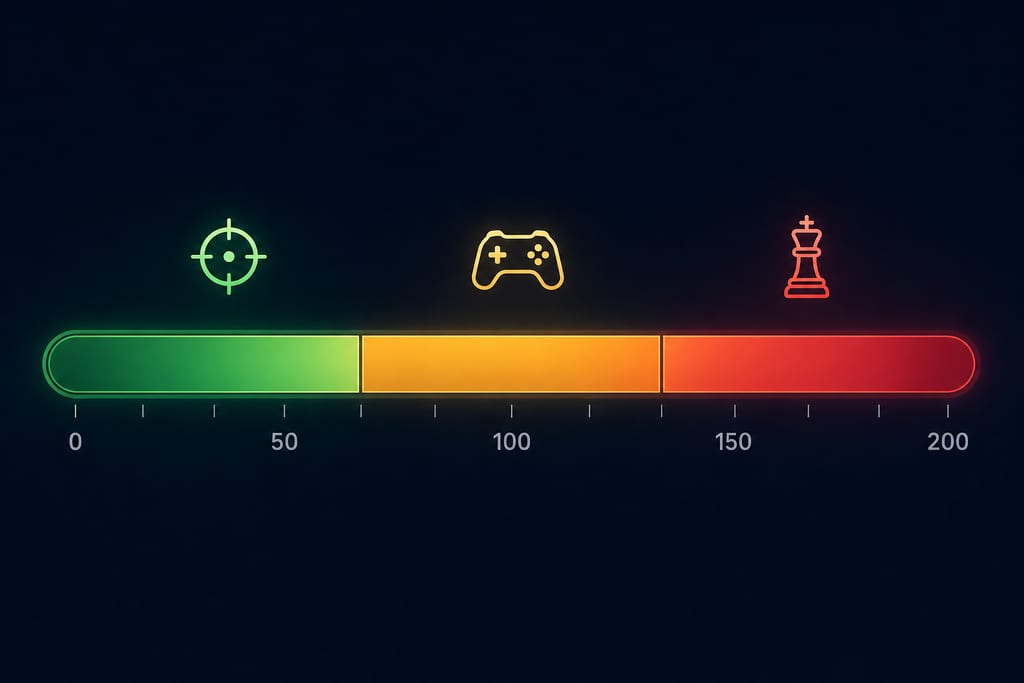
Under 20ms is LAN territory, and it usually takes a wired connection sitting close to a regional server. On iPhone over Wi-Fi, that’s rare, so don’t treat it as a goal.
| Range | How it feels | Fits |
|---|---|---|
| Under 20ms | Instant, no delay | Wired competitive play |
| 20 to 50ms | Clean hit registration | Shooters, fighters, Rocket League |
| 50 to 100ms | Slight delay, still fair | MOBAs, card games, Pokemon GO |
| Over 150ms | Rubber-banding, dead abilities | Nothing competitive |
Turn-based games and idle clickers barely register any of this. Civilization or Marvel Snap will play the same at 30ms or 180ms, because the server waits for you.
Cloud gaming is the strict one. With GeForce Now or Xbox Cloud, every button press travels to the server and the video travels back, so aim for under 40ms or the whole picture starts lagging behind your thumb.
How to Check Your Ping on iPhone and Mac
Start inside the game. Most shooters and MOBAs show live ping in the settings menu or on the scoreboard, and that number comes from the actual server you’re playing on, which makes it the one worth trusting.
Browser speed tests measure the distance to the test company’s server, not to the game host. Treat the result as a rough baseline, nothing more.
On a Mac, Network Utility was removed years ago, but you still have two tools. Open Terminal and type ping -c 20 8.8.8.8 to see twenty round trips and the average, or hold Option and click the Wi-Fi icon to open Wireless Diagnostics for signal quality. On iPhone, a speed test app or the game’s own network stats screen covers it.
Run these three checks before you blame the game:
- Test once while idle, with nothing else running
- Test again mid-match, when the connection is under real load
- Test a third time while someone streams video on the same Wi-Fi
- Record jitter and packet loss alongside the ping, not ping on its own
The walkthrough below uses Windows, but the ping command and what the output means work the same way in Mac Terminal.
Why Your Ping Looks Fine but Feels Bad
A low average hides a lot. Jitter is how much your ping bounces between packets, and a steady 80ms beats a 40ms that spikes to 200ms every few seconds, because your game can’t predict an unstable connection.
Packet loss is the other hidden one. Anything above 1 to 2 percent gives you teleporting enemies and abilities that never fire, even when the number on screen looks healthy.
Three things decide whether your connection feels stable:
- Distance to the server, which sets a floor no app can beat
- Shared Wi-Fi in hotels, dorms and cafes, where congestion never shows in your ping reading
- The route your ISP takes to the game host, which can wander badly
That last one is the only case where a different path is worth testing. Routing is also where most of the honest discussion about whether a VPN lowers ping lives, since encryption adds a hop of its own.
If you want to try an alternate route on an iPhone, iPad or Apple silicon Mac, GamingVPN lets you pick a server and compare, though the result depends on your connection and the location you choose.
Set Your Number Before Your Next Match
Write down one target for the game you open most. Shooter players, hold yourself to 50ms. MOBA and card players, 100ms is fine. Then measure it where it counts, in a live match with the lobby full, and save that figure somewhere you can find it. After that, change one thing. Move closer to the router, kill the background download, swap the server. Retest in another real match before you touch anything else. One change at a time is the only way to know which one actually helped.
More About Ping and Lag
Does paying for a faster download speed lower my ping?
No. Download speed is how much data your line carries at once. Ping is how long one small packet takes to make the round trip. A gigabit plan and a 100 Mbps plan on the same network usually show the same delay. A faster plan only helps if background downloads are choking your line mid-match.
Why does the ping in Terminal look lower than the ping inside my game?
The two tools measure different things. Terminal sends a plain packet to an address and the reply bounces straight back. Your game’s figure adds the server’s own processing between ticks, and some networks give those plain ping replies lower priority than live game traffic. Compare each tool against itself over time.
Is 5G or LTE good enough for competitive mobile gaming?
Good 5G usually is. LTE more often lands in the playable band and spikes when your phone hands off between towers, which is why matches feel worse on a moving train. Stay put while you play. If you want to try a different route on cellular, GamingVPN runs on iPhone with no sign-in.